
What is a billing account?
The legal entity your spaces are billed under. Link one or several organizations to it and receive one consolidated monthly invoice.
A billing account represents the company being billed for your spaces, and it's where that company sees everything it runs in Smplrspace: billed spaces and their renewals, usage analytics, billing details, and its sandbox. It receives one consolidated invoice each month covering every organization linked to it.
Billing accounts and organizations
Organizations are where the work happens. The billing account is where your company oversees it all: what's billed, what's renewing, and how everything is being used.
- One billing account can cover several organizations, for example a company with a separate organization for each business unit. Everything lands on a single monthly invoice.
- Smplrspace includes 3 free spaces, shared across your organizations that aren't linked to a billing account. Linking an organization lifts that limit.
To keep separate workstreams organized, you usually don't need separate organizations: projects group spaces within one organization, with access tokens and analytics that can be scoped per project.
How to create a billing account
Open the organization switcher from the top bar, go to the Billing tab, and click "Set up billing account".

The setup takes two steps:
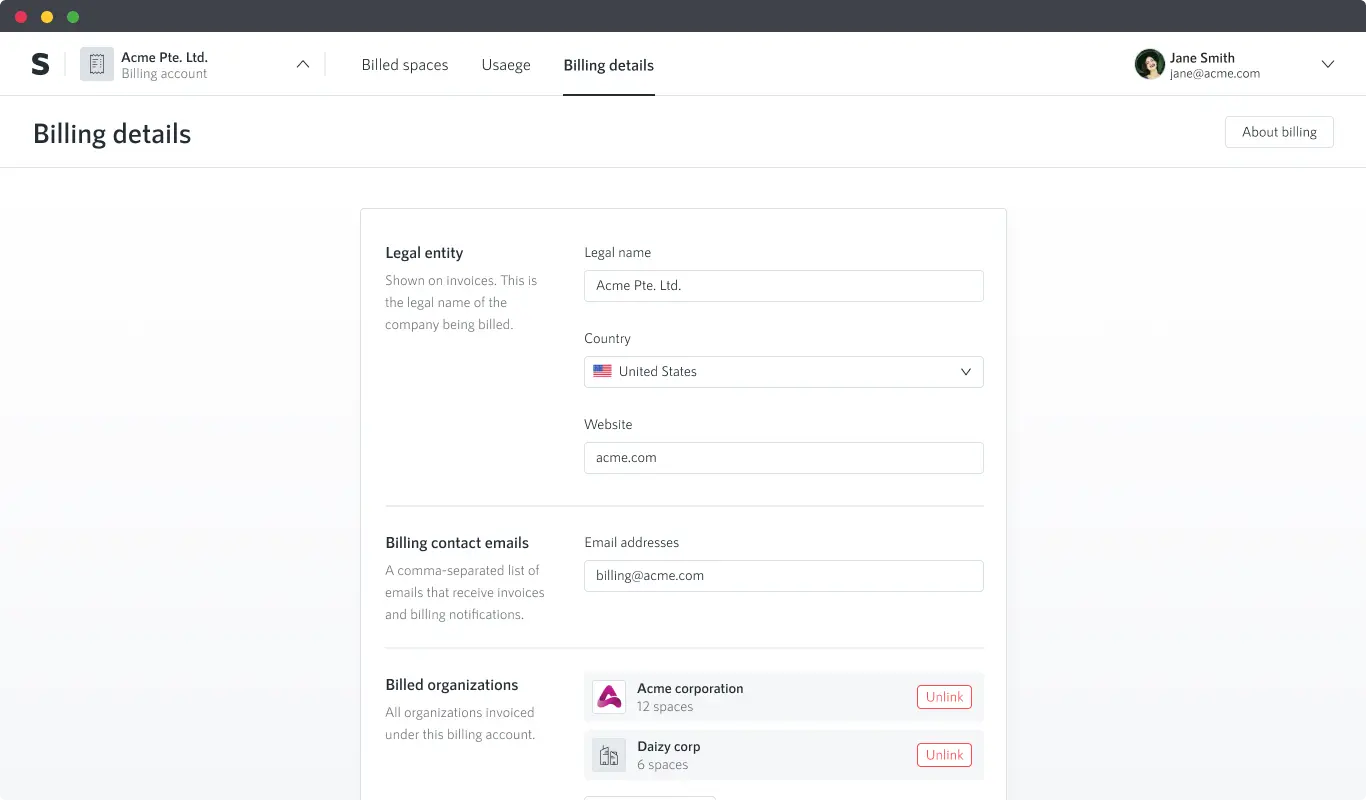
- Account details. The legal name of the company being billed, its country and website, and the billing contact emails that receive invoices. Multiple comma-separated addresses are supported.
- Link organizations. Choose which of your organizations to link. You can also include a sandbox organization for testing and demos, at no charge.
.png)
How to link an organization
You can link an organization from two places:
- The Billing tab of the organization switcher. Click "Link" next to any organization that isn't linked yet.
- The billing account's Billing details tab. Click "Add organization" and select the organizations to link.
A short confirmation follows. From then on, the organization's spaces are invoiced under the billing account.

Your billing account
In your billing account you will find three tabs. One for your billed spaces, one with usage analytics, and one with your billing account details.
The Billed spaces tab
Billed spaces shows every space linked to the billing account and where each one stands: how big it is, how much it's viewed, and when it renews. It's the tab that tells you what's coming up, so a renewal never takes you by surprise, and you can archive a space ahead of time if it's no longer worth keeping.

The Usage tab
The usage analytics show how your spaces are actually being used across every linked organization: total and billable views over time, compared against the previous period, with notable changes like sudden spikes or dormant spaces called out. It's how you understand what's driving your usage and which spaces earn their keep.

The Billing details tab
Billing details is where the account itself is managed: the legal information shown on invoices, who receives them, which organizations are linked, and the sandbox. It's the tab you visit when something about the company or its billing setup changes.
Who can see the billing account
Any member of a linked organization can view the billing account. Keep that in mind when linking organizations with external collaborators. And if you belong to organizations under different billing accounts, the Billing tab of the organization switcher lists each of them.
Sandbox organizations
Every billing account can include one sandbox organization: a separate organization for testing, demos, and experiments, at no charge and never billed.